
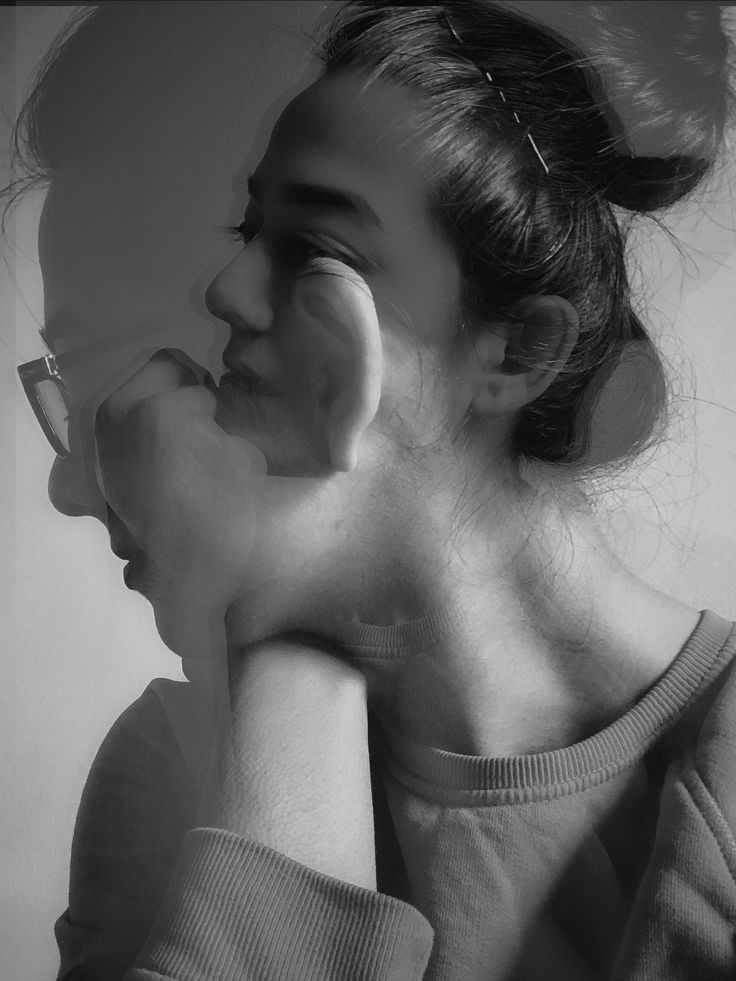
Creating breathtaking images has never been more accessible, thanks to Double Exposure Snapseed. This innovative feature allows users to layer two photos together for a visually compelling and artistic effect. Whether you’re a seasoned photographer or a beginner experimenting with your mobile device, Snapseed makes achieving professional-grade double exposures simple and intuitive.
What is Double Exposure?
The Concept of Double Exposure Snapseed
Double Exposure Snapseed refers to a creative photo editing technique available in the Snapseed app, where two images are layered together to form a harmonious composition. This approach merges different visual elements into one captivating frame, often producing artistic and surreal results.
Historical Context of Double Exposure Snapseed
In the days of analog photography, creating double exposures required meticulous work with film cameras, exposing the same frame twice. Now, with Snapseed’s Double Exposure feature, this technique is not only simpler but also more versatile, eliminating technical hurdles while offering users endless opportunities to explore their creativity.
Features of Snapseed
What Makes Snapseed Unique?
Snapseed, developed by Google, is one of the most versatile photo editing apps available. It offers professional-grade tools, including a dedicated Double Exposure feature, in a user-friendly interface.
Tools Related to Double Exposure
In addition to double exposure, Snapseed provides tools like Selective Adjust, Tune Image, and Curves, which help fine-tune your creations for the perfect result.


Once you’ve created a unique look using Snapseed’s Double Exposure tool, you can save and reuse that style easily by turning it into a Snapseed QR Code
How to Use Double Exposure in Snapseed
Step-by-Step Guide for Beginners
- Open Snapseed: Import the base image you want to edit.
- Navigate to “Tools”: Select “Double Exposure” from the list.
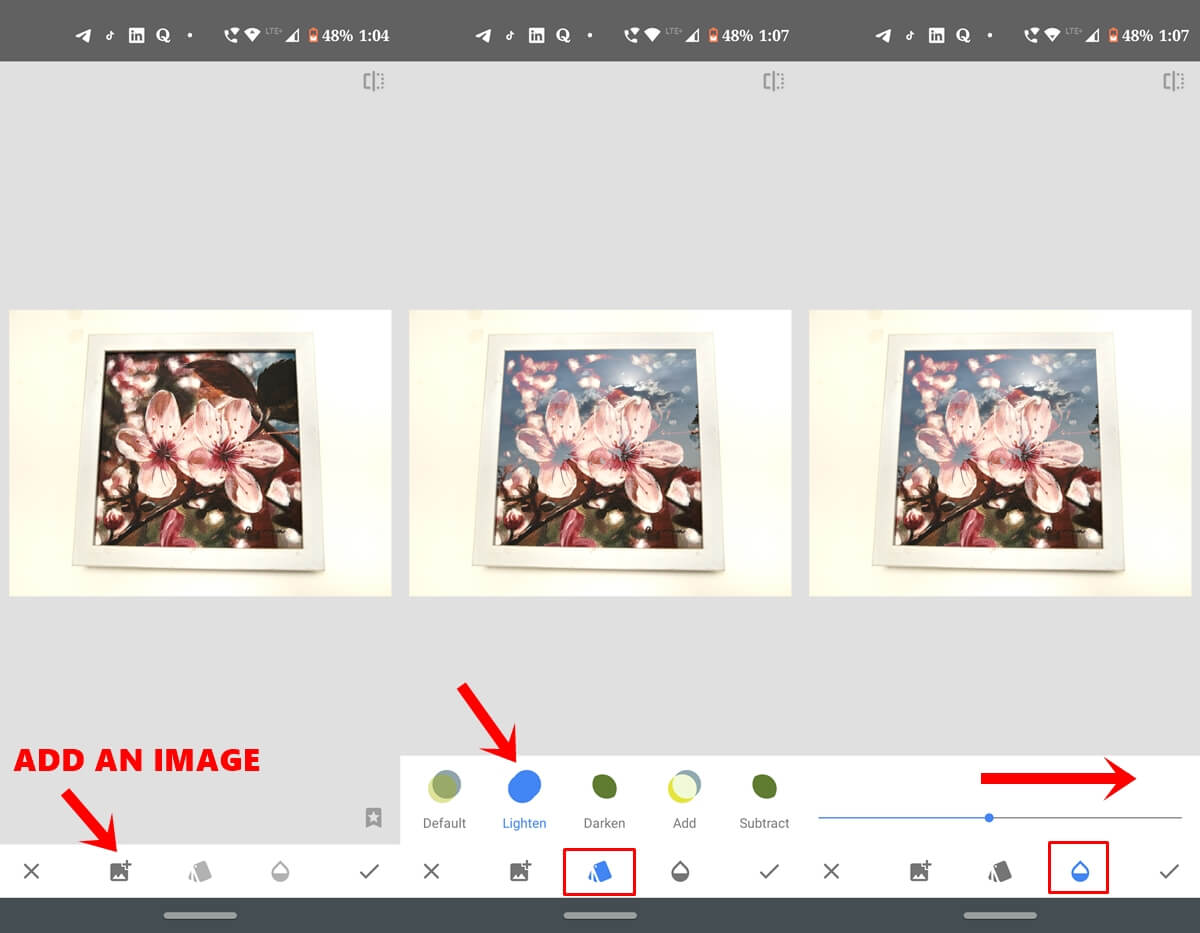
- Add a Second Image: Tap the “+” icon to choose a secondary image.
- Adjust Opacity: Use the sliders to blend the two photos seamlessly.
- Fine-Tune: Experiment with blending modes (e.g., Lighten, Darken) to achieve the desired effect.
- Export: Once satisfied, save your work by tapping “Export.”
Advanced Techniques for Creative Edits
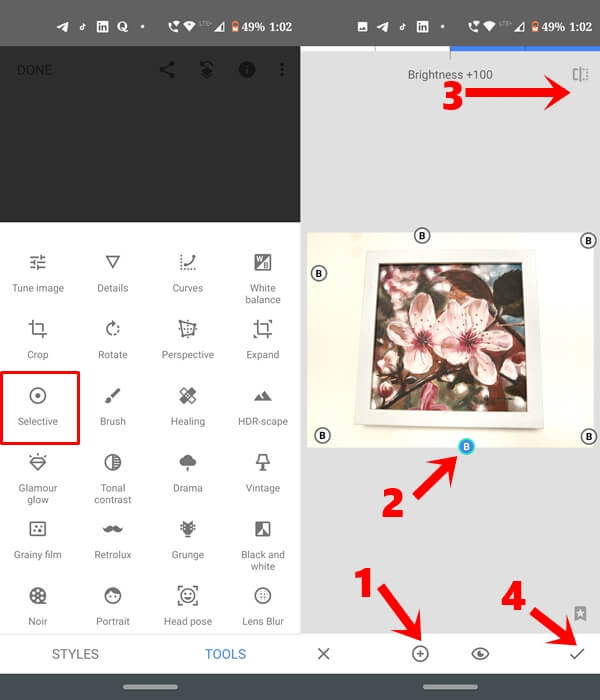
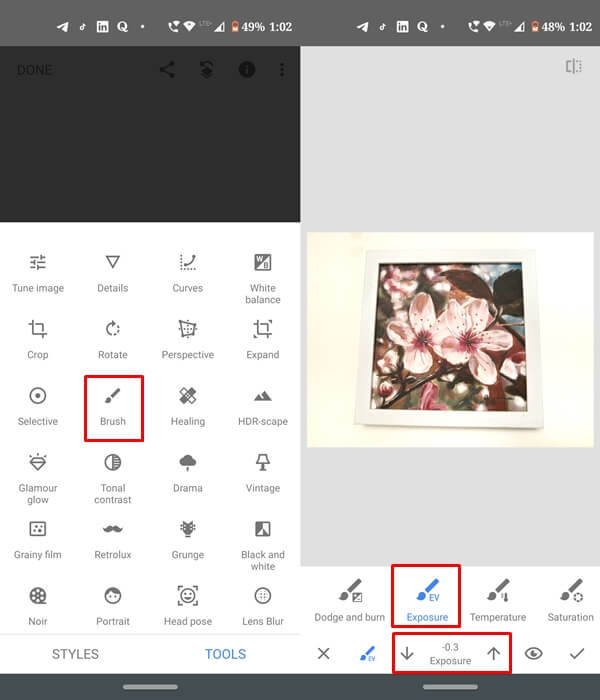
For more intricate designs, use the Brush tool to selectively reveal parts of the layered image or the Curves tool to refine tones and contrast.
Tips for Perfect Double Exposure
Choosing the Right Images
Combine a portrait with a nature scene, such as trees or mountains, for a classic double exposure.
Balancing Exposure and Contrast
Ensure that the images are well-lit and balanced to avoid overexposure.
Playing with Blend Modes
Experiment with different blending modes to add texture and depth to your final image.
For visual inspiration and creative Double Exposure ideas made with Snapseed, explore curated edits on Pinterest

Common Mistakes and How to Avoid Them
Overlapping Issues
Misaligned images can ruin the effect. Use Snapseed’s alignment tools for precision.
Oversaturation
Avoid using overly vivid colors that can clash; subtlety often leads to a more polished look.
Creative Ideas for Double Exposure
Nature and Portrait Blends
Overlay landscapes or natural textures on portraits to evoke a connection to nature.
Urban and Abstract Compositions
Use cityscapes, geometric patterns, or lights for a modern, edgy vibe.
Benefits of Using Snapseed for Double Exposure
Accessibility and Free Features
Snapseed is a free app, making professional-level editing accessible to all.
Customization and Precision
Its wide range of tools ensures you can create unique, personalized edits every time.
FAQs
How do I access the Double Exposure tool in Snapseed?
Simply open the “Tools” menu and select “Double Exposure.”
Can I use Snapseed for commercial purposes?
Yes, Snapseed is free and allows for non-commercial and commercial editing.
What images work best for double exposure?
High-contrast images with clear subject differentiation typically yield the best results.
Does Snapseed support high-resolution editing?
Yes, Snapseed retains high resolution when exporting edited images.
Are there presets for Double Exposure?
Snapseed does not offer presets, but its tools allow for full customization.
Is Snapseed better than Photoshop for Double Exposure?
Snapseed is more accessible and simpler to use, while Photoshop provides advanced features for professionals.
Conclusion
Double Exposure Snapseed opens a world of artistic possibilities for anyone with a creative eye and a smartphone. With its intuitive design and powerful tools, Snapseed enables you to produce stunning double exposure effects effortlessly. Download Snapseed today and let your imagination run wild!